Check Internet connection using a simple app on MAC
 Many times I end using a computer in places with a poor or erratic wifi connection, so while I’m surfing the web, checking my email, or writing a message, if something does not work as expected I’m not sure if the problem is my Internet connection or a specific web site.
To check Internet is working or not we have to open Terminal application in OSX and check with a ping 8.8.8.8 command if everything is working well at least at the basic level. You can avoid this by using a simple MAC app called Icon Ping.
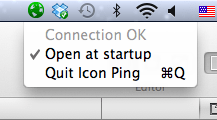
The world icon will change color accordingly to the state of the connection:
- Green if we receive pong packets back from 8.8.8.8. Connection OK.
- Yellow if we receive pong packets, but with a delay that is greater than 300 milliseconds. Connection Slow.
- Red if we don’t receive pong packets for three seconds or more. Connection not working.
The application almost has no user interface at all, if not for a tiny menu used to quit the application or to set it to automatically restart at the next reboot.
Its a open source app so you can change things if you like. Try out this tiny wonderful app today by clicking here to download.


