Install older version of Mac OS
 Sometimes you want to install an older version of Mac OS, due to older hardware or you just liked the older OS more.
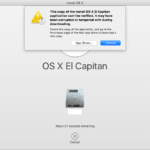
For that, you will need an ISO of older version which is readily available on any torrent sites. But even after that while installing you get errors like: This copy of OS cannot be verified or is corrupt etc. You get this error 99% of the time as Apple don’t verify older OS and wants you to install the latest one.
There is a work around which is quite simple:
Open System Preferences > Date & Time uncheck “Set date and time automatically” and set date to 2/1/2016. And then try installing the OS it will work.


